

Home Assistant Integration 
Section titled “Home Assistant Integration ”The Music Assistant integration for Home Assistant provides a connection from MA to HA. This means that MA players are visible in HA and can be controlled via the HA UI or via automations or scripts.
About the integration
Section titled “About the integration”-
The integration is an official part of Home Assistant, there is no need to install custom components
-
The integration can connect to the MA server which is running either as a Home Assistant App or as a docker container on the same or another host system
See also the documentation from Home Assistant about the Music Assistant integration
What you can do with it
Section titled “What you can do with it”-
Announcements from HA in the form of Text to Speech or audio files are fully supported.
-
With some additional setup voice control of MA via HA is also possible
How the pieces fit together
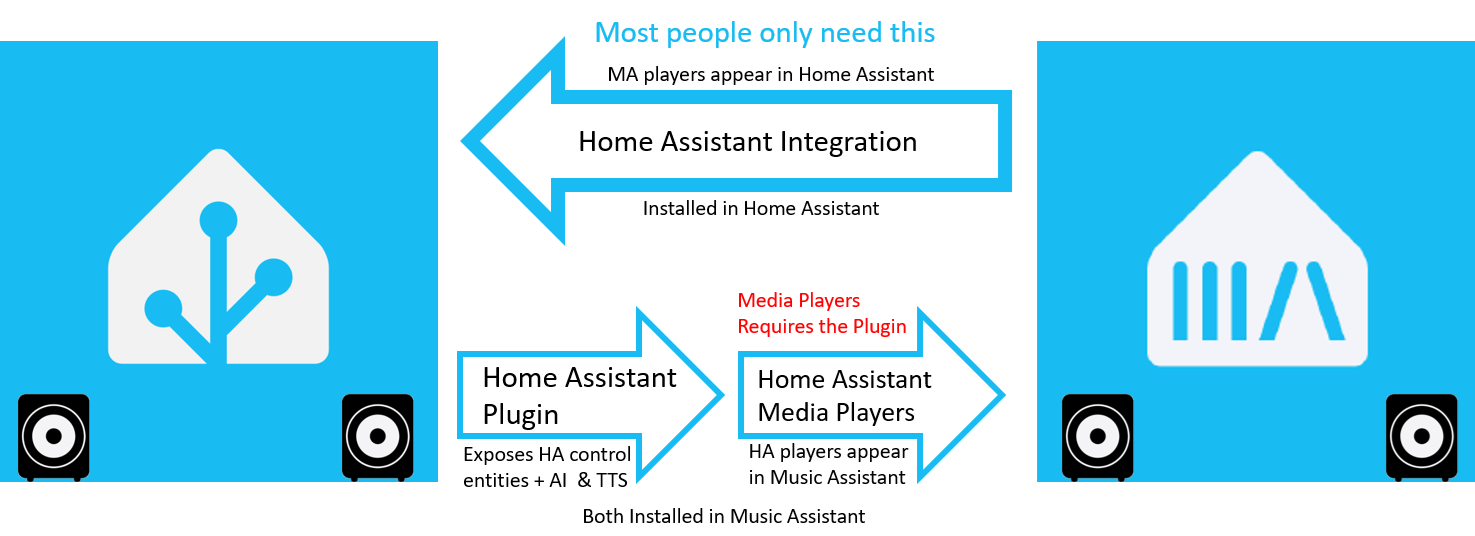
Section titled “How the pieces fit together”Music Assistant and Home Assistant can be joined in both directions, and there are three separate pieces involved. Which ones you need depends on which direction you want.
| Piece | You install it in | What it gives you |
|---|---|---|
| Home Assistant Integration | Home Assistant | Your MA players appear in HA, ready for the HA UI, automations, scripts, announcements and voice |
| Home Assistant Plugin | Music Assistant | The connection back the other way. It adds no players by itself, but it lets you drive any MA player’s power, volume or mute from an HA entity, and it gives plugins such as AI Radio access to Home Assistant’s AI and text-to-speech |
| Home Assistant Media Players | Music Assistant | Your HA media players appear in MA as places you can play music to |
Most people only want the first row. Install the integration and your Music Assistant speakers show up in Home Assistant — that is the whole job.
Add the third row if you also want the reverse: a speaker that Home Assistant knows about, but Music Assistant has no provider for, made available inside Music Assistant. It needs the plugin. The plugin does not need the integration, so the second and third rows work without the first.
You may want the plugin on its own, without the third row. It is what lets you map a Home Assistant entity to the power, volume or mute control of any Music Assistant player, so that, for example, an amplifier sitting in standby can be woken when playback starts, and it is how plugins reach Home Assistant’s AI and text-to-speech services.
This website uses privacy-first analytics to help us improve the site. You can view all data in our public dashboard.